

About Ford radio codes
Ford fitted Visteon-made radios to most of its cars and vans from the mid-1990s to about 2008, among them the 4000 RDS, 4500 RDS, 5000 RDS, 6000 CD, 6006 CD and the Ford Sony CD. Earlier Fords had Philips-made radios, or older radios with a 3-number code. From about 2008 Ford moved to a different kind of serial, starting Z and later A.
Which Ford radios show the serial on screen
The Visteon-made ones do: the 4000 RDS, 4500 RDS, 5000 RDS, 6000 CD, 6006 CD and the Ford Sony CD. Switch the radio on and hold two of the numbered buttons for a couple of seconds. On the 6000 CD and most Fords from about 2003 that is buttons 1 and 6; on older radios it is buttons 2 and 6.
The screen then scrolls through several lines of letters and numbers for about 30 seconds, and the serial usually comes last. If it is part of a longer string, such as EFD3014V193789, the serial is the last 7 characters: V193789.
Three kinds keep the serial on a label instead: the early-1990s Philips-made radios (serial starting FO), the older radios with a 3-number code, and the TravelPilot sat nav (serial starting BP or C7). Those have to come out of the dash, and our radio removal guide shows how.
M or V: what the letter means
Both are Visteon serials, and the letter tells you which family the radio belongs to. M is the earlier one: the 4000 RDS, early 4500 RDS, 5000 RDS, Sound 2000, 3000 Traffic and the first 6000 CDs, in Fords up to about 2005. V is the later one: the 6000 CD, 6006 CD, later 4500 RDS and the Sony CD, in most Fords from about 2003 to 2008.
Both take a 4-number code, put in the same way. M codes are worked out from the serial, and V codes come from a table that covers every V serial. On either, a letter O counts as a zero.
Z (about 2008 to 2017) and A (2018 on) are a different scheme altogether, and the free check tells you straight away whether we can do yours. If we can’t, look for the code card Ford supplied in the handbook wallet, or ask a Ford dealer, who can look the code up from the VIN and the radio serial.
Entering the code with buttons 1 to 6
While the radio waits for its code, the screen shows CODE and four dashes. Buttons 1 to 4 each look after one number: press button 1 until the first number of your code shows, then do the same with buttons 2, 3 and 4. Each press counts up by one, and the tenth brings the number back round to 0.
Button 5 sends the code. A Land Rover with the same Visteon radio finishes with the right-hand arrow button instead. Button 6 only comes into it if the radio locks, as below.
Fords with a Z or A serial work differently: they have number keys, and the code is confirmed with * or OK.
What LOCKED 10 and LOCKED 13 mean
LOCKED and a number means wrong codes have been tried, and the number is how many. At LOCKED 10 the radio stops taking codes for a while: leave the radio and the ignition on for about an hour, or hold button 6 for 10 seconds to get 3 more tries. At LOCKED 13 those tries are used up, and only a Ford dealer or a radio specialist can reset it.
So before the next try, check where the code came from. A code written in the handbook belongs to the radio the car left the factory with, which may not be the one in it now. And a serial read off the scrolling screen is easy to get one character wrong, or to take from the wrong part of the scroll.
How to find your Ford radio serial number
Most Ford radios show their serial on the screen, so you don’t need to take anything apart. The serial tells us exactly which code your radio needs.
On the screen
- Turn the ignition on and switch the radio on.
- Hold buttons 1 and 6 together for 2–3 seconds.
- Watch the screen: the serial scrolls past, usually last. Write down the letter and 6 numbers.
- Nothing? Try buttons 2 and 6 instead. Still nothing? The serial is also on a label on the radio itself.
On the label
The serial is also printed on a label on the top or side of the radio. Most radios slide out with a pair of radio removal keys (a few pounds from any car parts shop). Push them into the slots on the front until they click, then ease the radio forward. Some have screws to undo first.
Photograph the label rather than copying it by hand — 0 and O, 1 and I are easy to mix up.
What your serial looks like
-
V123456Ford V-series (6000 CD)V and 6 numbers Instant -
M123456Ford M-series (Visteon)M and 6 numbers Instant -
123456Older Ford (3-number code)Last 6 numbers of the serial Instant -
FO667SL0457930Ford Philips (early 1990s)14 letters and numbers starting FO Instant -
1234567Ford TravelPilot7 numbers (leave out the BP or C7) By email -
Z123456Ford Z / A serials (2008 on)Z or A and 6 numbers Not available
Can’t find it or can’t read it? Send us a photo of the label: £9.99, with a full refund if we can’t find your code.
Screen shows nothing and the radio has to come out? How to remove a car radio shows which release keys you need and where they go.
Which Ford radio do you have?
These are the radios Ford fitted we know about, and whether we can unlock them. Not sure which is yours? Type the serial in: the free check works it out for you.
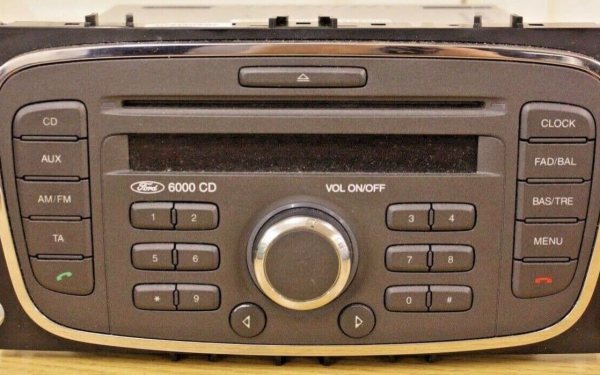 Ford V-series (6000 CD)
Serial
V123456 Locked CODE ---- Serial: Hold 1 + 6
InstantGuide
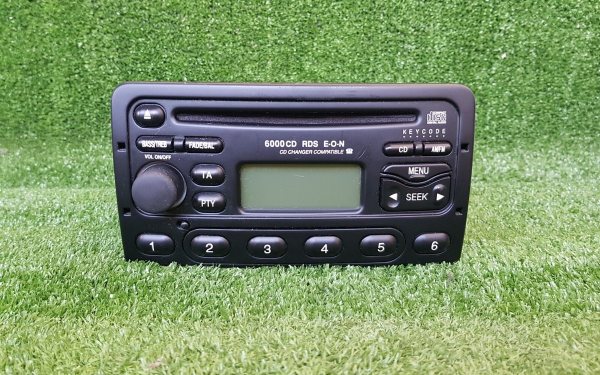 Ford M-series (Visteon)
Serial
M123456 Locked CODE ---- Serial: Hold 2 + 6
InstantGuide
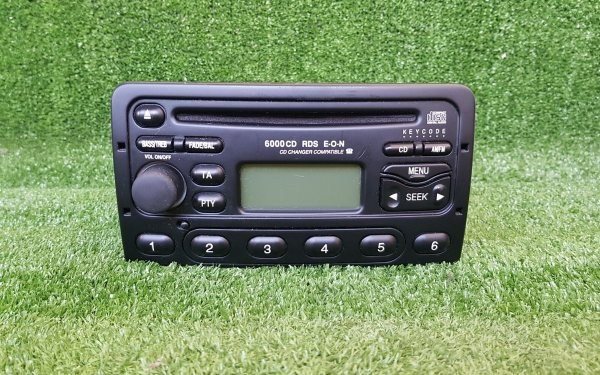 Older Ford (3-number code)
Serial
123456 Locked CODE ---- Serial: On the label on the radio
InstantGuide
Locked display
CODE ----
Serial FO667SL0457930
Ford Philips (early 1990s)
Serial: On the label on the radio
InstantGuide
Locked display
CODE ----
Serial 1234567
Ford TravelPilot
Serial: On the label on the radio
By emailGuide
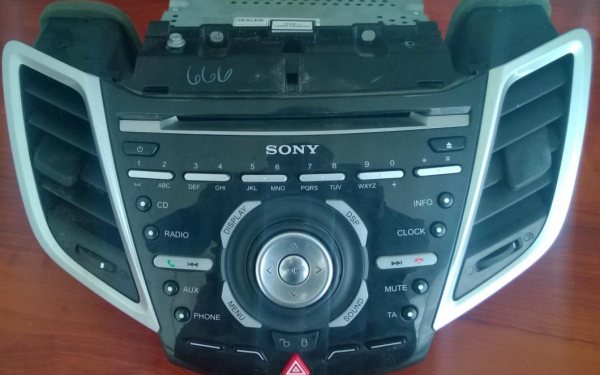 Ford Z / A serials (2008 on)
Serial
Z123456 Locked CODE ---- Serial: Hold 1 + 6
Not availableGuide
Popular Ford models
Step-by-step help for the Ford models people ask us about most:
- Ford Focus radio code
- Ford Fiesta radio code
- Ford Transit radio code
- Ford Mondeo radio code
- Ford Ka radio code
- Ford Transit Connect radio code
- Ford Galaxy radio code
- Ford Fusion radio code
- Ford Escort radio code
- Ford C-Max radio code
- Ford S-Max radio code
- Ford 6000 CD radio code
- Ford 5000 RDS radio code
- Ford 4000 RDS radio code
- Ford 6006 CDC radio code
- Ford Sony CD radio code
- Ford TravelPilot radio code
- Ford 3000 Traffic radio code
We also cover:
- Puma
- Cougar
- Ranger
The serial is what counts, as radios are often swapped between cars.
How to enter your Ford radio code
Once you have your code, key it in like this. The example below shows the button presses. Your order page shows the same steps next to your code.
- Press button 1 until the first number of your code shows. Do the same with buttons 2, 3 and 4.
- Press button 5 to finish (Land Rover: the right-hand arrow button).
- Code not accepted? The screen shows LOCKED and a number. Stop before it gets to 10 and read our locked radio help.
- Press button 1 until the first number of your code shows. Do the same with buttons 2, 3 and 4.
- Press button 5 to finish (Land Rover: the right-hand arrow button).
- Code not accepted? The screen shows LOCKED and a number. Stop before it gets to 10 and read our locked radio help.
- Set each of the 3 numbers with the numbered buttons.
- Finish as your handbook shows (usually button 5).
- Usually: press button 1, set the number with the tuning buttons, then press button 1 again.
- Do the same for all 4 numbers. The exact steps vary from radio to radio.
- Set each number with the numbered buttons, then confirm.
If your Ford radio says LOCKED, WAIT or SAFE
Each wrong code makes the radio wait longer before the next try, and some radios lock for good after too many. Don’t guess: get the right code first, then follow the steps for your radio.
| Radio | What to do |
|---|---|
| Ford V-series (6000 CD) | LOCKED 10: leave the radio and ignition on for about an hour, then try again, or hold button 6 for 10 seconds to get 3 more tries. LOCKED 13 means those tries are used up: the radio then needs a Ford dealer or a radio specialist. |
| Ford M-series (Visteon) | LOCKED 10: leave the radio and ignition on for about an hour, then try again, or hold button 6 for 10 seconds to get 3 more tries. LOCKED 13 means those tries are used up: the radio then needs a Ford dealer or a radio specialist. |
| Ford Philips (early 1990s) | Each wrong try adds a longer delay. Keep the radio switched on while it counts down. |
What LOCKED, WAIT and SAFE mean, and how long to wait →
Why we use your radio’s serial, not your number plate
A radio code belongs to the radio, not the car. A dealer usually looks it up from the Ford’s number plate or VIN (the 17-character number in your logbook), which only works if the car still has the radio it left the factory with. Radios are often swapped under warranty, upgraded, or changed by a previous owner.
The serial is printed on the radio itself, so the code matches the radio in front of you. It is also what lets us check for free before you pay. Main dealers often charge £30–£130, and you usually have to book the car in.
What we can and can’t do
We can do
- Ford 4000 RDS, 4500, 5000C, 6000 CD, 6006 CDC, Sony CD — M and V serials
- Every V-series serial covered
- Older Ford radios with 3-number codes, and 1990s Philips radios
- TravelPilot sat nav radios with a serial starting BP or C7
- Jaguar and Land Rover radios with a Ford M serial
We can’t do (yet)
- Ford SYNC and touchscreen radios
- Z and A serials (roughly 2008 on)
We always tell you before you pay. Not sure? Send us a photo of the label.
Ford radio code questions
How do I make my Ford radio show its serial?
Turn the ignition on, switch the radio on and hold buttons 1 and 6 for a couple of seconds. Nothing after two tries? Use buttons 2 and 6, which older Ford radios need. The serial is a letter and 6 numbers, and it usually comes last in the scroll.
The serial on my Ford screen is part of a longer string. Which part do I need?
The last 7 characters: the M or V and the 6 numbers after it. In EFD3014V193789, for example, the serial is V193789.
Is a letter O in my Ford serial a zero?
Yes. On M and V serials a letter O counts as a zero, so type it as 0.
My Ford serial starts with Z or A. Can you help?
Not at the moment. Fords from about 2008 have a serial starting with Z, and from about 2018 with A. These work differently, and our free check tells you straight away, before you pay.
Does my Ford radio have to come out of the dash?
Not if it is an M or V radio: those show the serial on screen. Only the early-1990s Philips-made radios, the older radios with a 3-number code and the TravelPilot sat nav keep it on a label.
How much is a Ford radio code?
£9.99 per code. The free check comes first, so you only pay once we know we can do it, and you get your money back if the code doesn’t work.
How long does it take?
Most Ford codes appear on screen the moment you’ve paid, and we email you a copy. If yours has to be looked up by our team, we email it within 2 hours and tell you before you pay.
What if the code doesn’t work?
Check the serial first: 0 and O, or 1 and I, are easy to mix up. Still stuck? Tell us from your order page and we’ll put it right or refund you in full.
Updated October 2026


