
About Sony radio codes
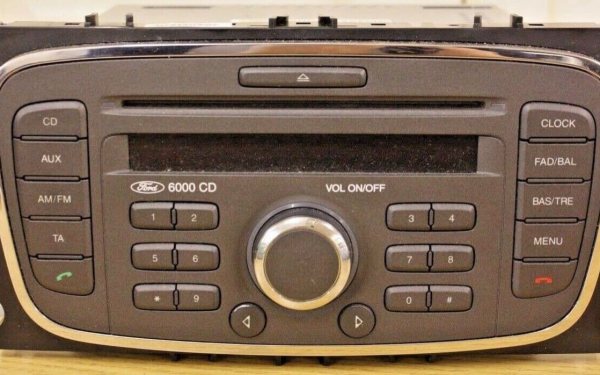
Ford badged some of its head units Sony, and where that unit shows a V serial when you hold two buttons, the code comes straight back. From about 2008 Ford moved to Z and then A serials on the Sony CD, MP3 and DAB units, and those are not something a serial can answer — we say so before you pay rather than after.
How to find your Sony radio serial number
Most Sony radios show their serial on the screen, so you don’t need to take anything apart. The serial tells us exactly which code your radio needs.
On the screen
- Turn the ignition on and switch the radio on.
- Hold buttons 1 and 6 together for 2–3 seconds.
- Watch the screen: the serial scrolls past, usually last. Write down the letter and 6 numbers.
- Nothing? Try buttons 2 and 6 instead. Still nothing? The serial is also on a label on the radio itself.
On the label
The serial is also printed on a label on the top or side of the radio. Most radios slide out with a pair of radio removal keys (a few pounds from any car parts shop). Push them into the slots on the front until they click, then ease the radio forward. Some have screws to undo first.
Photograph the label rather than copying it by hand — 0 and O, 1 and I are easy to mix up.
What your serial looks like
-
V123456Ford V-series (6000 CD)V and 6 numbers Instant
Can’t find it or can’t read it? Send us a photo of the label: £9.99, with a full refund if we can’t find your code.
Which Sony radio do you have?
These are the Sony radios we know about, and whether we can unlock them. Not sure which is yours? Type the serial in: the free check works it out for you.
Radios and cars
Covers:
- Sony CD
- Sony CD/MP3
Years: 2003–2008 for the ones we can do. The serial is what counts, as radios are often swapped between cars.
How to enter your Sony radio code
Once you have your code, key it in like this. The example below shows the button presses. Your order page shows the same steps next to your code.
Ford V-series (6000 CD)
- Press button 1 until the first number of your code shows. Do the same with buttons 2, 3 and 4.
- Press button 5 to finish (Land Rover: the right-hand arrow button).
- Code not accepted? The screen shows LOCKED and a number. Stop before it gets to 10 and read our locked radio help.
If your Sony radio says LOCKED, WAIT or SAFE
Each wrong code makes the radio wait longer before the next try, and some radios lock for good after too many. Don’t guess: get the right code first, then follow the steps for your radio.
| Radio | What to do |
|---|---|
| Ford V-series (6000 CD) | LOCKED 10: leave the radio and ignition on for about an hour, then try again, or hold button 6 for 10 seconds to get 3 more tries. LOCKED 13 means those tries are used up: the radio then needs a Ford dealer or a radio specialist. |
What LOCKED, WAIT and SAFE mean, and how long to wait →
What we can and can’t do
We can do
- Ford Sony units with a V serial
We can’t do (yet)
- Sony units with a Z or A serial (2008 on)
- Sony’s own aftermarket head units
We always tell you before you pay. Not sure? Send us a photo of the label.
Sony radio code questions
My Ford has a Sony radio — can you do it?
If holding buttons 1 and 6 brings up a serial starting V, yes, instantly. If it starts Z or A, no, and the free check will tell you that without charging you.
Is this the same as a Sony aftermarket radio?
No. These are Ford head units wearing a Sony badge. Sony’s own aftermarket range is a different thing and is not covered.
How much is a Sony radio code?
£9.99 per code. The free check comes first, so you only pay once we know we can do it, and you get your money back if the code doesn’t work.
How long does it take?
Most Sony codes appear on screen the moment you’ve paid, and we email you a copy. If yours has to be looked up by our team, we email it within 2 hours and tell you before you pay.
What if the code doesn’t work?
Check the serial first: 0 and O, or 1 and I, are easy to mix up. Still stuck? Tell us from your order page and we’ll put it right or refund you in full.
Updated September 2026